









4.1
Free
3uTools
Repair tool for iOS devices

View an ad to download for free
GFXplorer is a software designed to allow its user to find, or just to have at hand, all the most important technical information, both hardware and software, of a PC.
Thanks to the tabs based user interface and the various categories available, all the information are easy and fast to read, and if reading is not enough: you can export all the information in a common plain text file (TXT) or Rich Text file (RTF) to be viewed anywhere and by anyone without being in front of the interested PC; whenever the need arises, receiving technical support or help on a forum or via email is a lot easier with detailed information of your system!
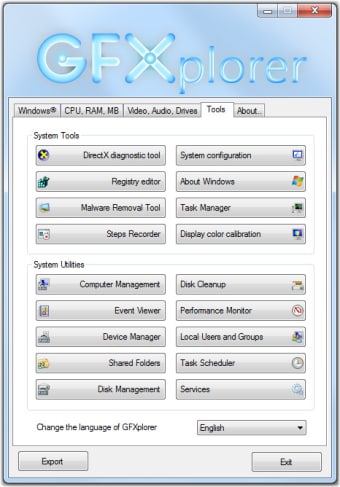
In addition, the Tools tab provides direct access to a wide range of Windows utilities, useful should you need to do a quick maintenance.
Information retrieved by GFXplorer:
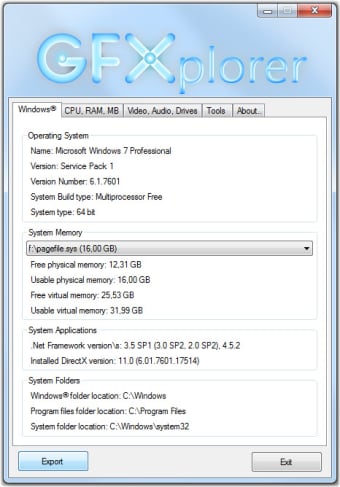
Microsoft Windows:
Name, version, architecture, major update or service pack installed;
DirectX and .Net Framework versions;
Usable\visible and free RAM, virtual memory and system folders.
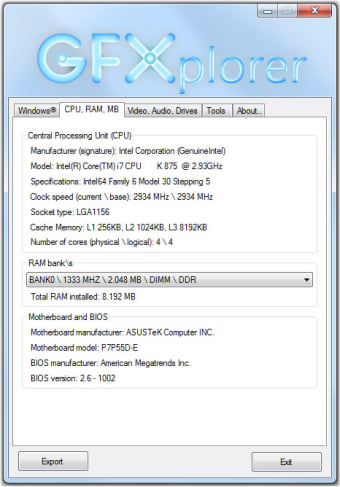
Central Processing Unit (CPU):
Manufacturer and digital signature;
Processor model;
Technical data about the Architecture, Family, Model and Stepping;
Current and base operative clock frequency;
Socket type and total Cache memory (per level).
System memory (RAM):
Size, speed and type of each bank of RAM installed;
Total installed RAM.
Motherboard (MB):
Motherboard model and maker;
BIOS model and version.
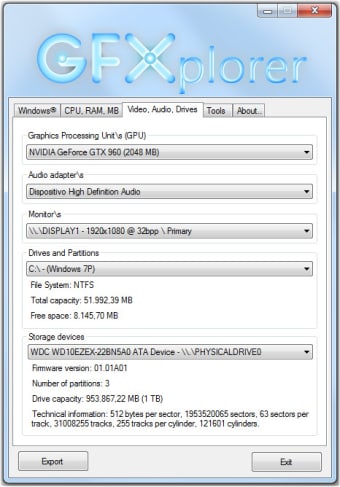
Video and audio cards:
GPU (Video card) model\s and VRAM;
Monitor\s screen resolution;
Audio adapter\s.
Drives and storage:
Partition\s list and label\s;
File System (per partition);
Available and total space (per partition);
Storage device\s list and id;
Connection interface (per storage device);
Firmware version (per storage device);
Number of partitions (per storage device);
Total storage capacity (per storage device);
Technical data about Sectors, Tracks and Cylinders (per storage device).
Free
Windows
Windows 2000
English
1.1K
868.78 KB
View an ad to download for free
Have you tried GFXplorer? Be the first to leave your opinion!
Add review
Download Graphics: Linux* [Red Hat* 3 Update 6]
Download BIOS Update [FYBYT10H.86A]
Download Marvell* SATA RAID Driver for Z77 Chipset-Based Desktop Boards
Record macros for automating your common tasks
Download Intel® Chipset Identification Utility

Optimize Charging with Impulse Charger Tool
Download Intel® Experience Center driver update
Erase all traces of activity from your PC

Efficient Document Viewer for eWriter Files
Efficient Remote Debugging for Windows Devices
Download Intel® PRO Network Driver for Windows 7* for Intel® Desktop Boards
Download Intel® HD Graphics driver for Windows XP64 - Embedded





